Building with AI Clients (MCP)
Kite is an MCP server, so AI clients like Claude Code, Codex and Cursor can read and build your apps. You describe what your bot should do in the client, and it creates the commands, event listeners and message templates for you. It can also look at your logs to find out why a flow failed, and fix it.
The client uses its own AI model, so this doesn't use flow AI prompts or credits. The flows it builds use credits when they run, like any other flow.
Create an API Token
Clients connect with an API token. Open API tokens in the dashboard and pick what the token can do:
- Apps access:
Full accesslets the client create, change and delete commands, event listeners, message templates and stored variables.Read onlylets it look at them, but not change anything. - Discord API: whether the client can also send requests to Discord as your bot. See Discord API below.
- Which apps: all of your apps, or only the ones you pick.
A token is a password to your bots. Anyone who has it can make them do anything your flows can, like ban members or delete messages. Never share it with anyone, not even Kite staff, and delete it in the same dialog if it leaks.
The token is only shown once, right after you create it. The dialog also shows how to add it to Claude Code, Codex, Cursor and VS Code.
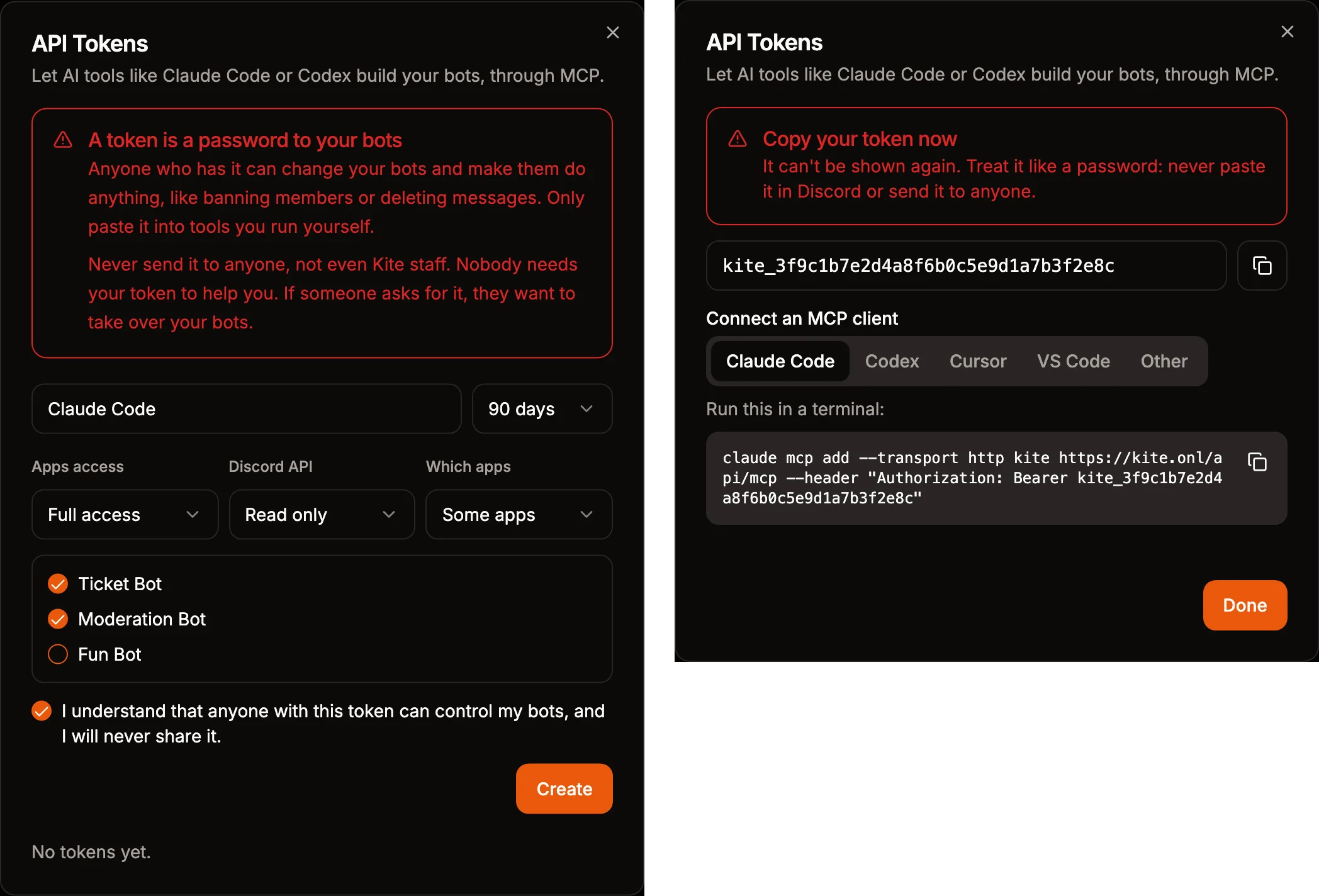
Connect Your Client
The server is at https://kite.onl/api/mcp. It uses Streamable HTTP and the token as a bearer token. Replace kite_... with your token.
- Claude Code
- Codex
- Cursor
- VS Code
- OpenCode
- Gemini
- Devin
- Other
Run this in a terminal.
claude mcp add --transport http kite https://kite.onl/api/mcp --header "Authorization: Bearer kite_..."
Codex reads the token from an environment variable. Run this in a terminal, and add the export line to your shell profile, like ~/.zshrc, so Codex has the token the next time you start it.
export KITE_API_TOKEN=kite_...
codex mcp add kite --url https://kite.onl/api/mcp --bearer-token-env-var KITE_API_TOKEN
Add this to ~/.cursor/mcp.json.
{
  "mcpServers": {
    "kite": {
      "url": "https://kite.onl/api/mcp",
      "headers": { "Authorization": "Bearer kite_..." }
    }
  }
}
Run MCP: Open User Configuration from the command palette and add this. GitHub Copilot's agent mode can then use Kite.
{
  "servers": {
    "kite": {
      "type": "http",
      "url": "https://kite.onl/api/mcp",
      "headers": { "Authorization": "Bearer kite_..." }
    }
  }
}
Add this to ~/.config/opencode/opencode.json. Don't put it in the opencode.json of a project, where the token could end up in Git.
{
  "$schema": "https://opencode.ai/config.json",
  "mcp": {
    "kite": {
      "type": "remote",
      "url": "https://kite.onl/api/mcp",
      "headers": { "Authorization": "Bearer kite_..." }
    }
  }
}
Google's Antigravity app and CLI share ~/.gemini/config/mcp_config.json. Add this to it.
{
  "mcpServers": {
    "kite": {
      "serverUrl": "https://kite.onl/api/mcp",
      "headers": { "Authorization": "Bearer kite_..." }
    }
  }
}
Gemini CLI takes a command instead.
gemini mcp add --scope user --transport http --header "Authorization: Bearer kite_..." kite https://kite.onl/api/mcp
Devin Desktop was called Windsurf before. Add this to ~/.config/devin/mcp_config.json, or %APPDATA%\devin\mcp_config.json on Windows.
{
  "mcpServers": {
    "kite": {
      "serverUrl": "https://kite.onl/api/mcp",
      "headers": { "Authorization": "Bearer kite_..." }
    }
  }
}
Add a remote MCP server with the URL above and the header Authorization: Bearer kite_.... Connectors in claude.ai, the Claude app and ChatGPT need you to sign in instead of a token, which Kite doesn't support yet.
What You Can Ask For
Start by telling the client which app to work on, or ask it to list your apps. Some examples:
- "Add a /poll command with a question and up to four options, and buttons to vote."
- "When someone joins, give them the Member role and welcome them in #welcome."
- "Why does my /ticket command fail? Check the logs and fix it."
- "Make all of my moderation commands log to #mod-log."
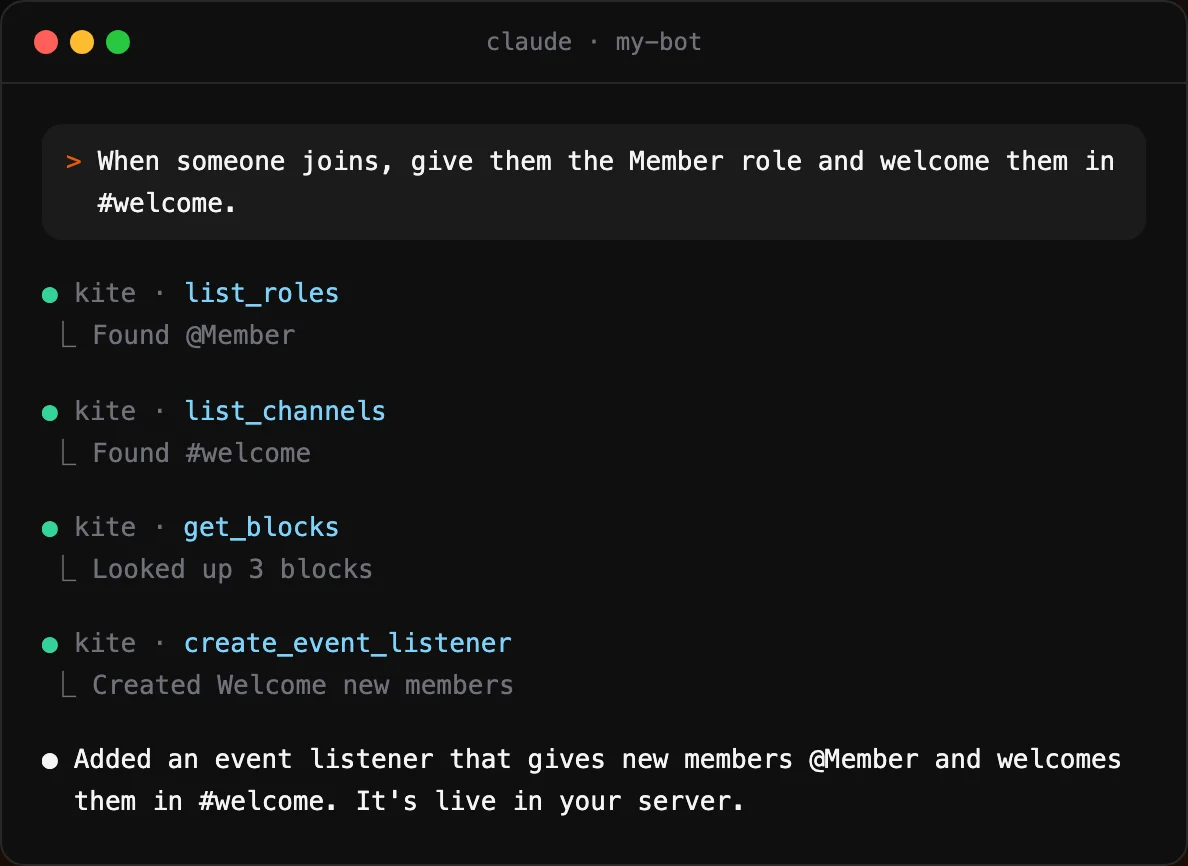
The client can see the channels and roles of your servers to fill in blocks, and it looks up how each block works before using it.
Changes are saved and live right away, and new commands show up in Discord within a minute. Every change is kept in the history of the command, event listener or message template, so you can undo it there. Kite tells the client to only delete or disable things you asked for.
Discord API
With Discord API access, the client can also send requests to Discord as your bot, for things that don't need a flow. It can read the members of a server, send a single message, or create channels and roles. Read only only allows requests that read from Discord.
The bot can only do what its roles allow in a server. A few endpoints can't be used from a client because one wrong request can't be undone: banning or deleting many at once, pruning members, and leaving a server. Requests that would return webhook tokens are blocked too. Flows can still use all of them with the Discord API Request block.
Every change is logged in your app's logs with the name of the token. Changes that show up in the server's audit log have the token's name as the reason. Clients can send up to 30 requests per minute.
Self-Hosting
The MCP server runs in the Kite website's server. If you self-host Kite with the static export of the website, it isn't available.